Browser-based editing
Preview every page and place text, images, or signatures directly on the document in your browser.
Search the PDF text layer, verify the detected matches, and apply one consistent replacement during export.
Focused PDF corrections
Search the PDF text layer, verify the detected matches, and apply one consistent replacement during export.
You preview and edit in the browser. On export, the PDF is sent over HTTPS to the server, processed in memory, and returned without file retention. Processing is not 100% on-device.
Preview every page and place text, images, or signatures directly on the document in your browser.
Edits are converted from screen pixels to PDF points before the export is processed.
The PDF is sent over HTTPS for export, processed in memory, and not retained on the server.
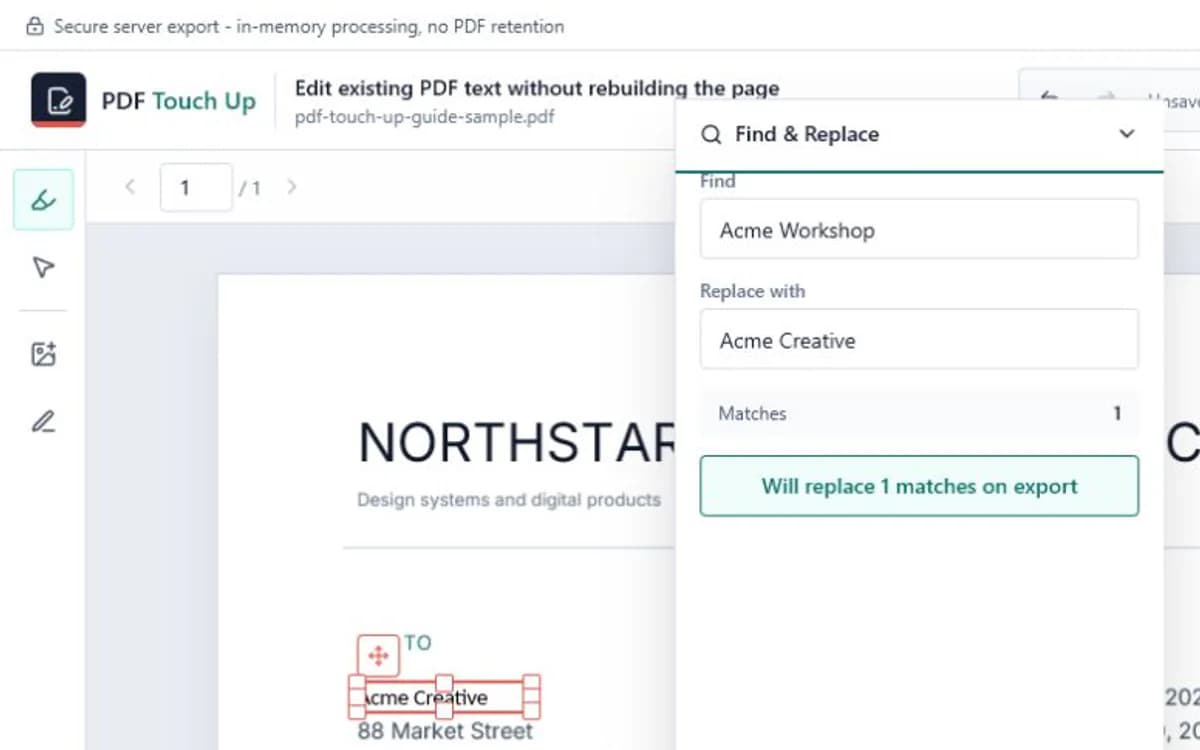
Find & Replace searches the PDF text layer and shows the number of detected matches before export. It is useful for repeated names, dates, labels, or addresses that should change consistently across several pages.
Review the match count before applying the replacement. Scanned pages without OCR do not contain searchable text, and heavily segmented fonts may split a visual sentence into multiple text runs.
Enter a specific phrase rather than a short fragment. The match counter lets you compare the result with what you expect before enabling the replacement. This reduces the chance of changing the same word inside an unrelated sentence, footer, or reference number.
PDF Touch Up sends only the matches you explicitly enabled to the export step. After export, search the downloaded copy for both the old and new text and inspect pages containing tables, rotated labels, or very small type.
A page can look like it contains text while actually storing only pixels. It can also position every glyph separately or map characters through a custom encoding. These files need OCR or a more specialized PDF repair workflow before reliable search and replacement is possible.
If the match count is lower than expected, do not export blindly. Try a shorter but still distinctive phrase, inspect the missing page at high zoom, and confirm that text can be selected in a standard PDF viewer.
Practical guides
No. It searches the existing PDF text layer. Image-only scanned PDFs need OCR before their words can be found.
Yes. The editor shows the detected match count and does not include replacements in export until you explicitly enable them.
The phrase may be split across text runs, use custom character encoding, or appear on an image-only page.
The editor carries detected font, size, color, weight, and position when available, with compatible fallbacks for unsupported source fonts.